
Introduction
Today, many teams still focus mainly on whether features work, not on whether they look right to users. This creates a real problem when layouts break, colors shift, or elements drift without being caught in functional tests. However, relying only on manual visual checks makes it worse, because repeated reviews are slow and small issues are easy to miss, leading to poor user experience and rework late in the release cycle.
To address this, AI-based visual testing tools like Applitools Eyes automatically compare screens across builds and environments, catch visual changes early, save time, and help teams release interfaces that look as intended.
What is Visual Testing and Why does it matter?
Visual testing mainly focuses on validating how an application looks rather than its functionality. With various combinations of browsers, devices, screen sizes, and operating systems, UI flaws can easily slip into production, negatively affecting user experience, trust, and brand identity.
Manual visual testing is slow, repetitive, and prone to human error. As applications scale, maintaining visual accuracy manually becomes almost impossible. To overcome this, a visual testing tool like Applitools Eyes automates the process by intelligently checking UI screens and detecting the differences that really matter.
What is Applitools Eyes?
Applitools Eyes is a cloud-based AI visual testing platform that automatically captures, compares screenshots. Instead of relying on pixel-by-pixel comparison, it understands the UI like a human and focuses on meaningful visual changes. It evaluates layout, alignment, spacing, fonts, colors, and responsiveness. This intelligent approach ensures visual consistency across different environments. As a result, teams save time, reduce rework, and deliver high-quality user interfaces.
Simple Work Flow of Applitools
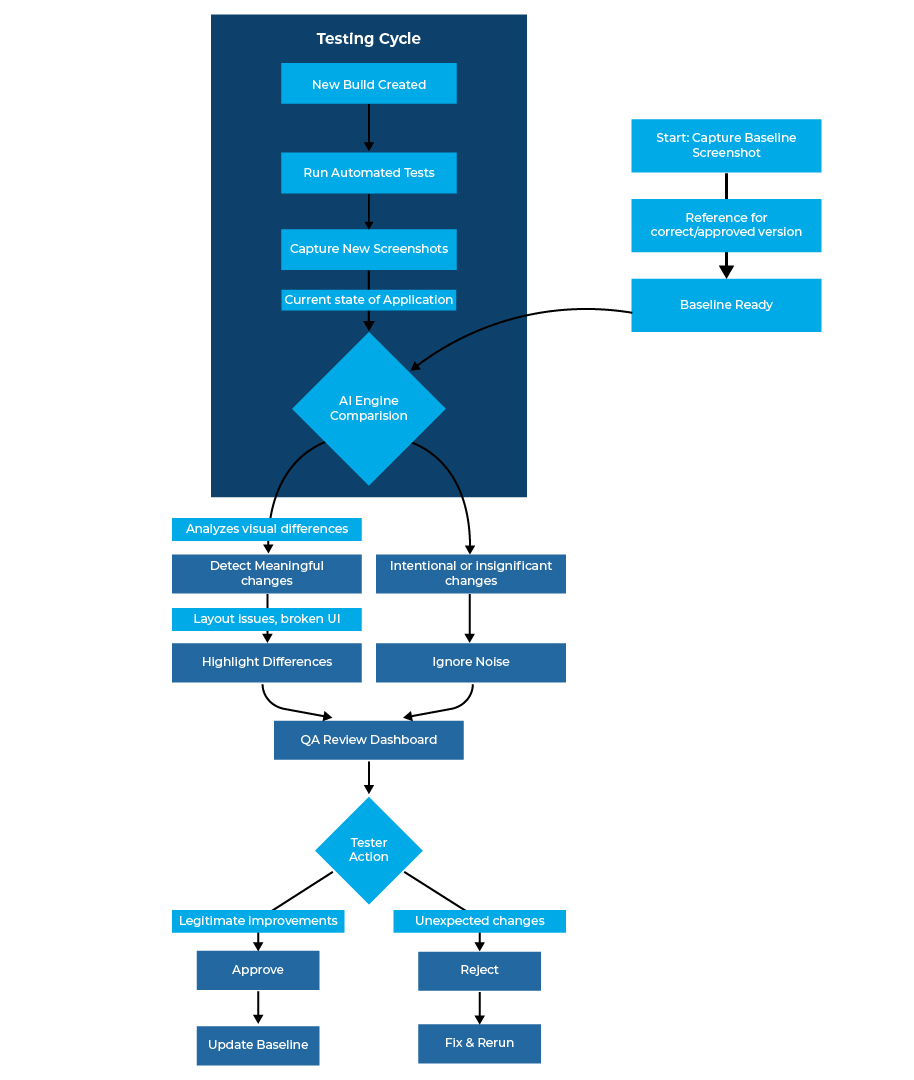
1. Capture Baseline screenshot
The process begins with capturing baseline screenshots. These are considered “golden images” and represent the correct visual state of the application. These baseline screenshots serve as a reference for all future comparisons.
2. Run a New Build and Capture New Screenshots
When a new build or UI update is available, automated tests are executed again, and fresh screenshots are captured to reflect the latest changes and ensure the updated interface is visually validated.
3. AI-Powered Visual Comparison
This is where Applitools Eyes shines. The Visual AI engine compares the baseline screenshots with the new screenshots. It identifies real visual differences and ignores irrelevant changes. Unlike pixel-based tools, it focuses on meaningful human-visual changes.
Background Processing:
- Applitools Eyes reads the DOM, CSS, and rendering instructions from test execution
- It recreates the same component visually in the cloud, replicating the structure exactly
- The platform then generates screenshots from the recreated component in the cloud
- Once both baseline and new screenshots are ready, the Visual AI engine compares them
4. QA Review and Approval
Results appear in the Applitools dashboard, where testers can approve expected changes or reject unexpected ones. This process ensures visual consistency across multiple devices and screen resolutions.
Key Features of Applitools Eyes
Visual AI Comparison
Applitools uses an intelligent Visual AI model trained on various visual patterns, reducing false positives and delivering highly accurate results.
Multi-Platform Support
Applitools ensures consistent visual behavior across multiple platforms, irrespective of testing a web app, mobile application, or desktop software.
Cross-Browser and Cross-Device Testing
Applitools provides wide coverage across:
- Chrome
- Firefox
- Safari
- Edge
- iOS devices
- Android devices
Self-Healing Tests
If the UI changes slightly due to intended design updates, Applitools can automatically accept changes, reducing test maintenance.
CI/CD Integration
Applitools integrates with CI/CD pipelines such as Jenkins, GitHub, Azure DevOps, and others, enabling continuous visual testing.
Integration with other Technologies
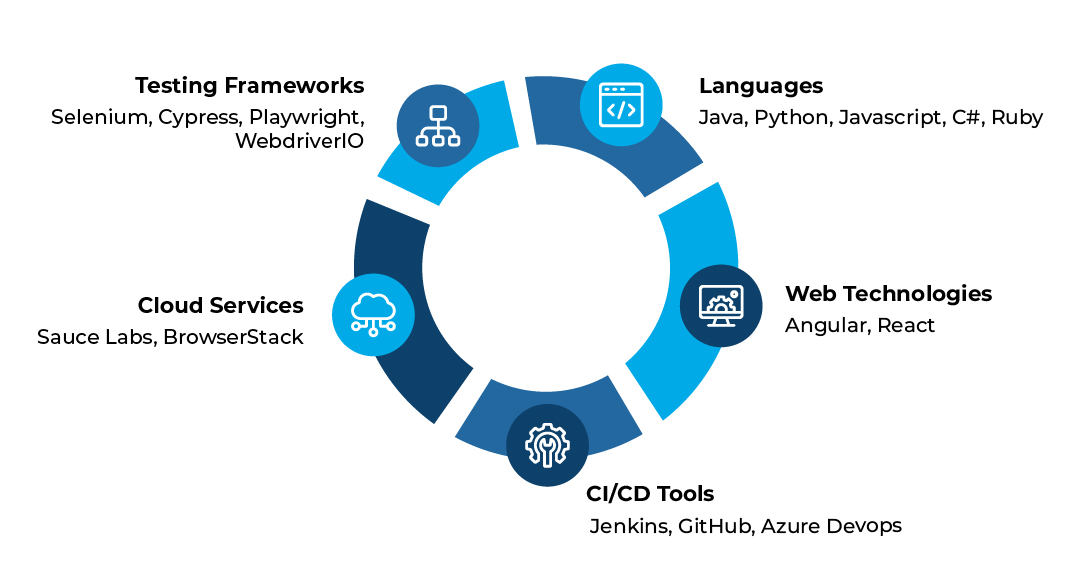
Supported Frameworks
Applitools integratesseamlessly with the below mentioned framworks:
- Selenium
- Cypress
- Playwright
- WebdriverIO
Supported Languages
Applitools supports test development in:
- Java
- Python
- C#
- Ruby
Web Technologies
Applitools is compatible with frameworks like React and Angular.
CI/CD Tools
Applitools can integrate with:
- Jenkins
- GitHub
- Azure DevOps
- BrowserStack
Use Cases
- UI Consistency – Applitools Eyes will be responsible for verifying that responsive layouts work correctly across mobile, tablet, and desktop devices.
- Detecting Style and CSS Changes – It helps in automatically identifying changes in color, padding, spacing, and typography.
- Brand Identity Management – It ensures fonts, colors, logos, and other brand elements remain consistent throughout development.
- Cross-Browser Validation – It verifies that UI elements match across Chrome, Safari, Firefox, Edge, and other browsers.
Advantages of Applitools
- AI-Based Analysis: Applitools Eyes uses Visual AI instead of Pixel-by-pixel comparison, so it can ignore irrelevant differences and focus on real UI issues
- Wide Coverage: Test once and validate across multiple browsers and different screen resolutions to ensure the UI looks perfect for every user
- Low Maintenance: Automatically adapts to minor layout changes, reducing test updates and ongoing maintenance effort
- Highly Scalable: It supports running thousands of tests in parallel without any performance degradation, even as applications and teams grow
Challenges and Limitations
- Cost Factor: Applitools Eyes is a licensed product, and its pricing may be high for small teams or organizations with tight budgets
- Cloud Dependency: Most features of Applitools Eyes rely on cloud processing, requiring stable internet connectivity
- Technical Skill Requirement: Technical Knowledge is required to use the advanced features provided by Applitools Eyes
Conclusion
Applitools Eyes is redefining visual testing by using AI to detect the UI changes that truly matter to users. By recreating application screens in the cloud and analyzing them with human-like perception, it delivers accurate, scalable, and reliable visual validation across browsers and devices. As digital experiences continue to evolve, tools like Applitools Eyes will play a key role in helping teams move faster, reduce rework, and confidently deliver interfaces that look right and work right.