
A Practical Guide to AI-Powered Java Version Upgrades
Modernizing legacy Java applications is a challenge many enterprises face today. Moving from Java 8 or Java 11 to newer long-term support (LTS) versions like Java 17 or Java 21 often involves dealing with deprecated APIs, incompatible libraries, build failures, and significant manual effort. With Amazon Q Developer AI, organizations can streamline and accelerate this modernization process more efficiently.
Amazon Q Developer addresses this challenge by providing an AI-powered, IDE-integrated Java transformation capability that automates Java version upgrades while preserving application stability and security. This blog combines both the conceptual overview and the hands-on migration workflow to provide a complete picture of how Amazon Q Developer helps teams modernize Java applications efficiently.
Why Java Modernization Matters
Upgrading to new Java versions is no longer optional for enterprise systems. Modern JDKs offer:
- Improved performance and memory management
- Enhanced security patches and long-term support
- Compatibility with modern frameworks and cloud-native architectures
- Higher developer productivity through modern language features
Despite these benefits, traditional Java upgrades are often risky and time-consuming. Amazon Q Developer simplifies this journey through automation, validation, and developer-controlled acceptance.
What is Amazon Q Developer AI?
Amazon Q Developer is a generative AI–powered assistant that supports developers across the software development lifecycle. Beyond code suggestions and troubleshooting, one of its most impactful capabilities is automated Java version transformation.
Key characteristics include:
- Native integration with popular IDEs
- Applies minimal and targeted code changes
- Iteratively builds and tests after each change
- Provides full transparency and review before updates are applied
Supported Java Upgrade Paths
Amazon Q Developer supports upgrading Java applications across commonly used LTS versions:
| Source Version | Target Versions |
| Java 8 | Java 17, Java 21 |
| Java 11 | Java 17, Java 21 |
| Java 17 | Java 21 |
| Java 21 | Java 21 (dependency modernization) |
Even when upgrading within the same Java version, Amazon Q Developer can modernize dependencies to align with current ecosystem standards.
Transformation Architecture and Workflow
Amazon Q Developer follows a structured and secure transformation workflow:
1. Initial Build and Analysis
- Performs a local build to validate project structure and dependencies
- Collects source code, metadata, and build logs
2. Transformation Plan Generation
- Identifies deprecated APIs and incompatible constructs
- Recommends framework and dependency upgrades
- Generates a project-specific transformation plan
3. Incremental Code Transformation
- Applies changes step by step
- Rebuilds after each modification
- Executes existing unit tests to ensure correctness
4. Dependency and Framework Modernization
Supported libraries include:
- Spring Boot, Spring Framework, Spring Security
- Hibernate, Jakarta EE
- JUnit, Mockito, TestNG
- Log4j, SLF4J, Jackson, Apache Commons
Optional YAML-based configuration enables controlled dependency upgrades.
Security and Governance Built In
Enterprise security is a first-class concern:
- Builds run locally, allowing access to private repositories and resources
- AI-generated code is reviewed before execution
- Changes are applied only after explicit developer acceptance
- Transformation artifacts remain available for audit and compliance
This ensures modernization without compromising governance or security standards.
Hands-On: Java Migration Using IntelliJ IDEA
Amazon Q Developer integrates seamlessly with IntelliJ IDEA for practical, step-by-step Java upgrades.
Prerequisites
- IntelliJ IDEA (Community or Ultimate) or any other supported IDE
- AWS account with Amazon Q Developer enabled
- Java application (for example, Struts with Hibernate)
- Apache Tomcat (for web applications)
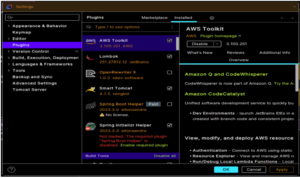
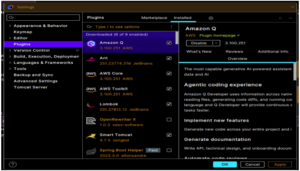
Step 1: Install Required Plugins
AWS Toolkit Plugin
- IntelliJ → Settings → Plugins → Search AWS Toolkit → Install
Amazon Q Developer Plugin
- IntelliJ → Settings → Plugins → Search Amazon Q Developer → Install
Restart the IDE after installation.
Step 2: AWS Authentication Setup
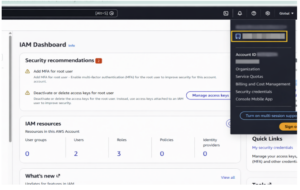
Get AWS Account ID
- Log in to the AWS Console
- Click the account name and copy the 12-digit Account ID
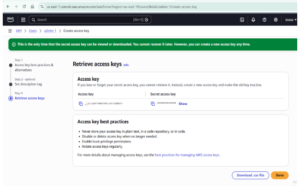
Create Access Keys
- IAM → Users → Security Credentials
- Create an access key
- Save the Access Key ID and Secret Access Key
Step 3: Connect Amazon Q in IntelliJ
- Open the AWS Explorer panel
- Click Connect to AWS
- Choose an authentication method:
- Access Key, or
- IAM Identity Center (SSO)
- Enter the Account ID, credentials, and region
A successful connection confirms access to Amazon Q Developer.
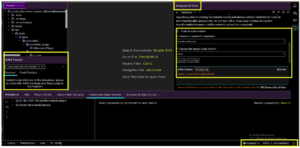
Step 4: Initiate Java Version Transformation
- Right-click the project or module
- Select Amazon Q → Transform Code
- Choose the source Java version (for example, Java 8)
- Choose the target version (Java 17 or Java 21)
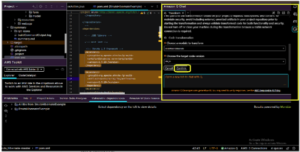
Amazon Q Developer automatically begins the transformation process.
What Happens Behind the Scenes
Amazon Q Developer performs the following steps:
- Securely uploads source code and metadata
- Analyzes deprecated APIs and incompatible libraries
- Generates a transformation plan
- Applies only the required code changes
- Iteratively builds and tests the application
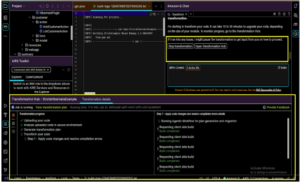
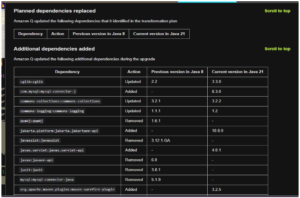
This significantly reduces manual migration effort.
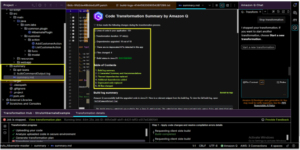
Reviewing and Accepting Changes
After completion, Amazon Q Developer provides:
- A transformation summary
- Build and test status
- A list of modified files
- Dependency upgrade details
You can:
- View file-level diffs
- Review the summary.md with logs and decisions
- Explicitly accept or reject changes
No updates are applied without developer approval.
Post-Transformation Steps
- Run a full local build using Maven or Gradle
- Address any remaining warnings
- Deploy and test the application (for example, using Tomcat in IntelliJ)
These steps help ensure production readiness.
Pricing Overview
Free Tier
- Limited monthly requests
- Java transformation for up to 1,000 LOC per month
Pro Tier ($19 per user per month)
- Higher request limits
- Up to 4,000 LOC per month (pooled)
- Administrative controls and security policies
- IP indemnity coverage
Key Benefits for Enterprises
- Faster Java modernization
- Reduced migration risk
- Improved application security and performance
- Consistent and auditable upgrade process
- Higher developer productivity with AI assistance
Conclusion
Amazon Q Developer provides a secure, automated, and enterprise-ready approach to Java version upgrades. By combining AI-driven code transformation, iterative validation, and developer-controlled acceptance, teams can modernize Java applications with confidence and speed. For organizations maintaining large Java estates, Amazon Q Developer serves as a powerful accelerator on the journey toward modern Java and cloud-native architectures.