
How Does the Playwright Framework Improve Browser Automation?
Maintaining consistent application quality across browsers remains a challenge for enterprise development teams. Manual testing, repetitive validation, and browser compatibility issues can slow release cycles and affect application reliability. The Playwright framework addresses these challenges through unified browser automation across Chromium, Firefox, and WebKit. With Python support, it enables scalable end-to-end testing, streamlines validation workflows, and helps development teams improve application quality and release confidence.
Why Choose Playwright?
Playwright provides a comprehensive approach to browser automation by addressing common testing challenges, including browser compatibility, execution speed, test reliability, and scalability. Its built-in capabilities help enterprise development teams streamline automation workflows, expand testing coverage, and support faster application releases.
Key capabilities and advantages include:
- Cross-Browser Compatibility: Supports Chromium, Firefox, and WebKit
- Automatic Waiting: Performs actionability checks before executing interactions
- Fast Execution: Supports efficient browser automation and test execution
- Flexible Browser Modes: Enables both headless and headed execution
- Isolated Browser Contexts: Maintains independent sessions for different users and tests
- Visual Evidence: Captures screenshots and videos for debugging and test analysis
- Parallel Execution: Supports simultaneous test execution to reduce testing time
- Python Integration: Enables Python-based test automation and development
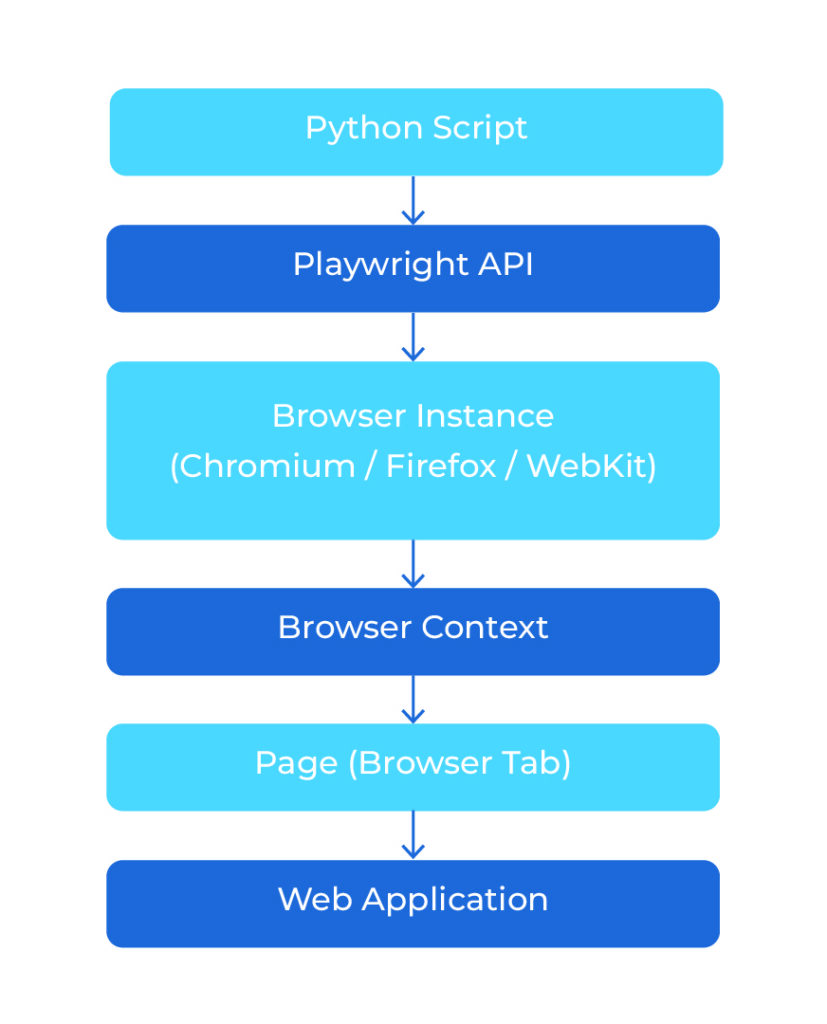
Features of Playwright
Playwright offers a comprehensive set of built-in capabilities that simplify browser automation and end-to-end testing. Unlike traditional automation approaches that often require multiple external libraries for common testing tasks, Playwright integrates essential automation capabilities into a single framework. These features help development teams create reliable, efficient, and maintainable automated test scripts.
Let’s explore the key features that make Playwright a practical choice for modern application testing.
1. Cross-Browser Support
One of Playwright’s biggest advantages is its support for multiple browsers. You can run automation scripts across Chromium, Firefox, and WebKit without maintaining separate test scripts for each browser.
This helps development teams verify application functionality across different browsers and deliver a consistent user experience.
Example:
browser = playwright.chromium.launch()
2. Automatic Waiting
Have you ever seen a test fail because a button or textbox was not loaded yet? Playwright solves this problem with Automatic Waiting. Before performing an action, such as clicking or typing, it automatically waits until the element is ready. This means you don’t have to use time.sleep() in most situations, making your tests faster and more reliable.
Example:
page.get_by_role(“button”, name=”Login”).click()
Playwright waits for the button automatically before clicking it.
3. Browser Contexts
A Browser Context is like opening a new browser profile. Each context has its own cookies, cache, and login session. This feature is very useful when you want to test multiple users in the same browser. For example, you can log in as an Admin in one context and as a Customer in another without their sessions affecting each other.
4. Easy-to-Use Locators
Finding web elements is an important part of automation. Playwright provides simple and reliable locator methods.
Some commonly used locators include:
- get_by_role()
- get_by_text()
- get_by_label()
- locator()
These locators make your automation scripts easier to read and maintain.
5. Multiple Tabs and Windows
Playwright can easily handle multiple tabs and allows you to switch between them without writing complicated code.
6. Screenshots and Video Recording
Playwright can capture screenshots and even record videos while your tests are running. These features are very useful when a test fails because they allow you to see exactly what happened during execution.
7. Parallel Execution
If your project contains hundreds of test cases, running them one by one can take a long time. Playwright supports parallel execution, allowing multiple tests to run at the same time. This reduces the total execution time and speeds up your testing process.
Conclusion
Playwright offers built-in capabilities that simplify browser automation and improve testing reliability. Features such as cross-browser support, automatic waiting, browser contexts, flexible locators, and parallel execution help development teams create maintainable test scripts and streamline testing workflows. With Python integration and CI/CD support, Playwright helps enterprise teams expand test coverage, identify issues earlier, maintain application quality, and improve release confidence.