
Playwright has emerged as a leading automation framework for modern application testing, enabling organizations to improve software quality, accelerate release cycles, and deliver consistent user experiences across browsers and devices. With its robust automation capabilities, cross-browser support, and developer-friendly architecture, Playwright enables enterprises to build consistent and reliable testing strategies that enhance engineering productivity, deliver measurable business value, and support continuous software delivery.
What is Playwright?
Playwright is an open-source test automation framework developed by Microsoft for modern web applications. It enables teams to automate end-to-end testing across Chromium, Firefox, and WebKit using a single, consistent API, ensuring reliable application behavior across major browsers. Beyond automation, Playwright helps enterprises accelerate software delivery, reduce production defects, and strengthen release confidence through early issue detection.
Why Choose Playwright for UI Testing?
Playwright provides a unified API for automating Chromium, Firefox, and WebKit, enabling reliable, flexible, and efficient UI testing for modern web applications.
Key Features
- Cross-Browser Support: Write a single test and execute it across Chromium, Firefox, and WebKit without code changes
- Auto-Wait Mechanism: Automatically waits for elements to become actionable before performing interactions, reducing flaky tests and improving reliability
- Headless and Headed Execution: Run tests in headless mode for faster CI/CD execution or in headed mode for debugging and development
- Built-in Test Runner: Includes Playwright Test, providing test execution, parallelization, reporting, and assertions without requiring third-party frameworks
- Modern Web Application Support: Supports single-page applications (SPAs), iframes, network interception, multiple browser contexts, and advanced web application scenarios
Why Is Playwright a Popular Choice for Browser Automation?
Playwright simplifies browser automation with a unified API, advanced debugging, network control, and parallel execution for efficient cross-browser testing workflows.
Key Advantages
Unified API Across Browsers
Automate tests across Chromium, Firefox, and WebKit using a single, consistent API, simplifying cross-browser testing.
Fine-Grained Browser Control
Interact with page elements, browser contexts, and user actions with precision, enabling the execution of complex test scenarios and realistic user interactions.
Built-in Device Emulation
Emulate mobile devices, tablets, and desktops to validate responsive designs across different screen sizes and operating systems.
Network Interception
Simulate varying network conditions, mock API responses, and intercept requests to validate application behavior under different scenarios.
Parallel Test Execution
Execute multiple tests simultaneously to reduce execution time and improve resource utilization, making it well-suited for large-scale test suites.
Seamless CI/CD Integration
Integrate effortlessly with CI/CD pipelines to automate regression testing, accelerate release cycles, and maintain application quality.
Playwright Architecture Overview
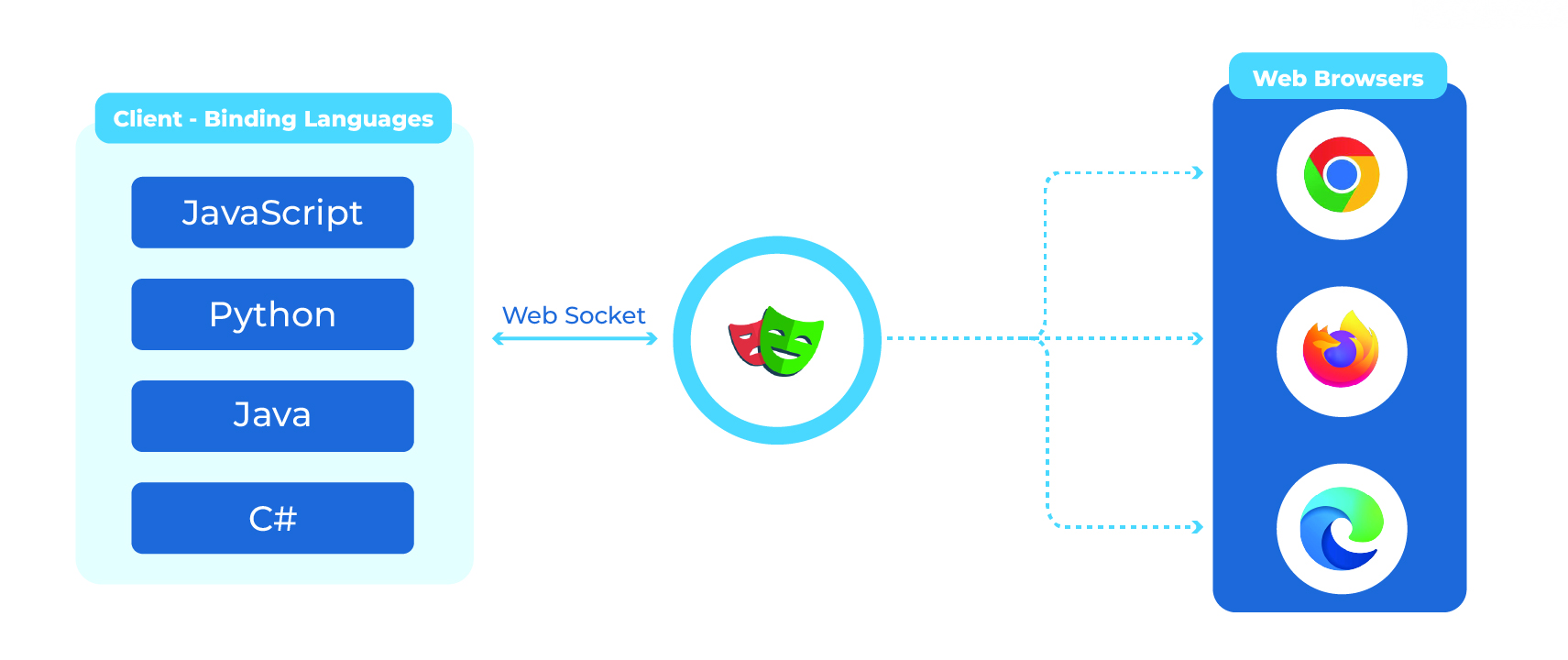
Playwright uses language bindings such as JavaScript, Python, Java, and C# to communicate with the Playwright driver over WebSocket. The driver then interacts directly with browser engines, including Chromium, Firefox, and WebKit, enabling reliable and consistent cross-browser automation.
This architecture is one of Playwright’s greatest strengths because it provides:
- A Unified Automation Interface: Write automation scripts using a consistent API across supported browser engines
- Reliable Browser Control: Communicate with browsers through protocol-level connections, ensuring stable and accurate test execution
- Scalable Test Execution: Support parallel execution and distributed testing, making it suitable for enterprise-scale automation
Setting Up Playwright for UI Testing
Setting up Playwright is simple and requires only a few steps. Once installed, you can create a project, install the required browser binaries, run your tests, and view detailed test reports.
Installation Steps
- Install Node.js (LTS version)
- Open a terminal and run: npm init playwright@latest
- Navigate to your project folder and install the browser binaries: npx playwright install
- Run the tests: npx playwright test
- View the test report: npx playwright show-report
Project Structure
A typical Playwright project includes:
├── tests/ # Test specifications
│ └── example.spec.ts
├── playwright.config.ts
└── package.json
Sample: First Test Suite

Run it with: npx playwright test
Market Standards and Playwright Alignment
Leading organizations adopt modern quality engineering practices to deliver reliable software at scale. These market-standard principles include:
- Shift-Left Testing
- Continuous Testing in CI/CD
- Scalable and Reusable Test Architecture
- Data-Driven Quality Decisions
Playwright aligns with these best practices by enabling reliable, scalable, and maintainable test automation. Its modern architecture makes it a strong choice for enterprises and product teams looking to scale software quality.
Measurable Business Impact
A well-implemented Playwright strategy delivers measurable business value across multiple dimensions, including:
- Faster Time-to-Market: Accelerates releases through parallel test execution and automated regression testing
- Reduced Production Defects: Identifies issues early in the development lifecycle, minimizing production failures
- Lower Cost of Quality: Reduces the cost of fixing defects by enabling early detection and validation
- Improved Customer Trust: Ensures stable, high-quality digital experiences through reliable application testing
- Higher Engineering Productivity: Minimizes test flakiness and manual effort, allowing teams to focus on innovation
Conclusion
Playwright is a powerful UI test automation framework that helps organizations deliver high-quality applications with greater speed and confidence. Its cross-browser support, robust architecture, and modern automation capabilities enable reliable and scalable testing. By reducing production defects, accelerating release cycles, and improving engineering productivity, Playwright strengthens customer trust and provides a solid foundation for delivering consistent, high-quality digital experiences at scale.