
Introduction
Feature flags, also known as feature toggles, are a software delivery mechanism that allows organizations to enable or disable application features at runtime without requiring a new code deployment. They give engineering teams greater control over releases, enabling controlled experimentation, incremental adoption, and rapid responses to issues while reducing the need for application rollbacks.
Benefits of Using Feature Flags
- Perform A/B testing across different user groups to evaluate features and experiences
- Reduce deployment risk through controlled releases and incremental feature activation
- Enable gradual rollouts of new features across selected users or environments
- Provide a kill switch to quickly disable problematic features when required
- Change feature behavior at runtime when the underlying configuration or feature management solution supports dynamic updates
Types of Feature Flags
1. Release Toggles
Used to gradually roll out new features independently of code deployments, allowing teams to separate feature releases from application deployments and support continuous delivery practices.
Implementation in Spring Boot:
- Use
@ConditionalOnPropertywith settings defined inapplication.propertiesorapplication.ymlfor configuration-based feature control - Use feature flag frameworks such as FF4J for centralized feature management and runtime control
2. Operational Toggles
Used to control operational capabilities such as logging, debugging, and performance-related settings, allowing teams to adjust application behavior without changing application code.
Implementation in Spring Boot:
- Use Spring Boot Actuator to expose operational endpoints and monitor application behavior
- Use external configuration management systems such as Spring Cloud Config to centralize and manage toggle-related configuration
3. Kill Switch Toggles (Emergency Shutdown)
Used to quickly disable problematic features in production, allowing teams to respond to unexpected issues without requiring an immediate rollback or redeployment.
Implementation:
- Use
@RefreshScopewith Spring Cloud Config when refreshable configuration is required and the application is configured to support dynamic property updates - Use feature flag management platforms such as FF4J or Unleash for centralized feature control and rapid deactivation
4. Remote Configuration-Based Toggles
Used to manage feature flag settings outside the application code, allowing teams to centrally update feature behavior without modifying the application source code.
Implementation:
- Use external configuration sources such as Spring Cloud Config, AWS Parameter Store, Consul, or ZooKeeper to manage configuration values remotely
- Use feature flag management platforms such as LaunchDarkly or Unleash for centralized feature configuration, targeting, and rollout management.
Architecture of Feature Flags in a Spring Boot Application:
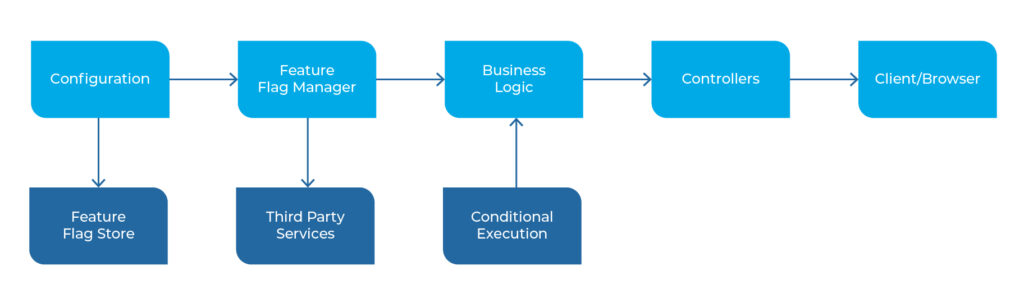
How Feature Flags Work in a Spring Boot Application
1. Configuration Source (YAML / Properties / Database / Remote Configuration):
Feature flag values can be stored in application.yml, application.properties, a database table, or a remote configuration source, depending on the application’s requirements and feature management approach.
2. Feature Flag Manager / Configuration Bean:
In Spring Boot, a @ConfigurationProperties class, @Service, or dedicated feature flag client can load feature flag values and make them available to the application.
3. Business Logic Layer:
The business logic evaluates feature flags before executing specific functionality, determining which application behavior should be enabled for a given user, environment, or request.
4. Controllers:
Controllers can use the evaluated feature flag state to determine which application behavior or response should be returned to clients.
5. Client Layer:
The UI layer, such as React or Angular, can also use feature flags to conditionally enable or disable interface elements and functionality. For security-sensitive functionality, however, feature flags should also be enforced on the server side rather than relying solely on client-side checks.
Implementing Feature Flags in Spring Boot
- Use Spring Profiles in
application.propertiesorapplication.ymlto control feature availability across different environments. - Use
@ConditionalOnPropertyto enable or disable application components based on configuration properties. - Use Spring Cloud Config to centrally manage feature flag properties across applications and environments when centralized configuration is required.
- Use dedicated feature flag solutions such as FF4J or Unleash when applications require centralized flag management, targeting, gradual rollouts, or runtime control.
Conclusion
Feature flags provide organizations with greater control over application releases, enabling controlled deployments, A/B testing, gradual rollouts, and rapid feature deactivation when issues arise. Spring Boot supports multiple implementation approaches, including configuration properties, conditional components, external configuration, and feature flag platforms. The right approach depends on application architecture, operational requirements, and the level of runtime control needed, helping teams manage feature delivery with greater confidence.