Introduction
Continuous Integration and Continuous Deployment (CI/CD) pipelines have become the backbone of modern software delivery. They automate builds, tests, and deployments, enabling teams to ship faster and more reliably. However, even the most advanced pipelines often suffer from inefficiencies, such as redundant test runs, delayed anomaly detection, and manual triage of failed builds.
To address these challenges, Artificial Intelligence (AI) comes in. By augmenting CI/CD with predictive analytics, anomaly detection, and smart automation, we can move from automated pipelines to intelligent pipelines. In this blog, we’ll explore how AI can transform CI/CD workflows, the tools emerging in this space, and how you can start experimenting today.
Why AI in CI/CD Matters
Traditional CI/CD pipelines are rule-based: they execute predefined steps such as running all tests, deploying code, and monitoring logs. As a result, they lack contextual awareness and adaptability.
Common Pain Points
- Every commit triggers the full test suite, even if only a small module changes
- Failed builds require manual investigation
- Production anomalies are often detected too late
AI’s Role
- First, learn from historical commits and test results to predict relevant tests
- Next, flag high-risk deployments before they reach production
- Finally, detect anomalies in real time and trigger automated rollbacks
Key Use Cases of AI in CI/CD
1. Smart Test Selection
Instead of running thousands of tests for every commit, AI evaluates code changes to determine which tests are most relevant. When a developer updates the authentication module, it prioritizes validating login-related functionality where failures are more likely. This selective execution speeds up pipelines while reducing unnecessary compute usage.
2. Predictive Deployment Risk Analysis
AI models trained on commit history and defect patterns help identify deployments that carry a higher risk. Changes involving critical elements, such as database schema modifications, are flagged based on past incidents that caused instability. This early insight enables teams to take corrective action before issues reach production.
3. Automated Rollback and Recovery
AI-driven anomaly detection continuously monitors logs and system metrics to identify unusual behavior. If error rates increase immediately after deployment, the system responds by triggering a rollback to restore stability. This automated response reduces downtime and ensures faster recovery from failures.
4. Resource Optimization
AI dynamically manages pipeline resources by aligning capacity with workload demands. During high activity, it distributes tasks across multiple agents while reducing usage when demand is low. This adaptive allocation enhances overall efficiency and helps optimize operational costs without compromising performance.
Architecture Overview
An AI-enhanced CI/CD pipeline may look like this:
- Stage 1: Commit → Build
- Stage 2: AI Risk Analyzer (predicts deployment risk based on commit history)
- Stage 3: Smart Test Selector (chooses relevant tests)
- Stage 4: Deployment
- Stage 5: AI Log Monitor (detects anomalies in production logs)
- Stage 6: Automated Rollback/Alerts
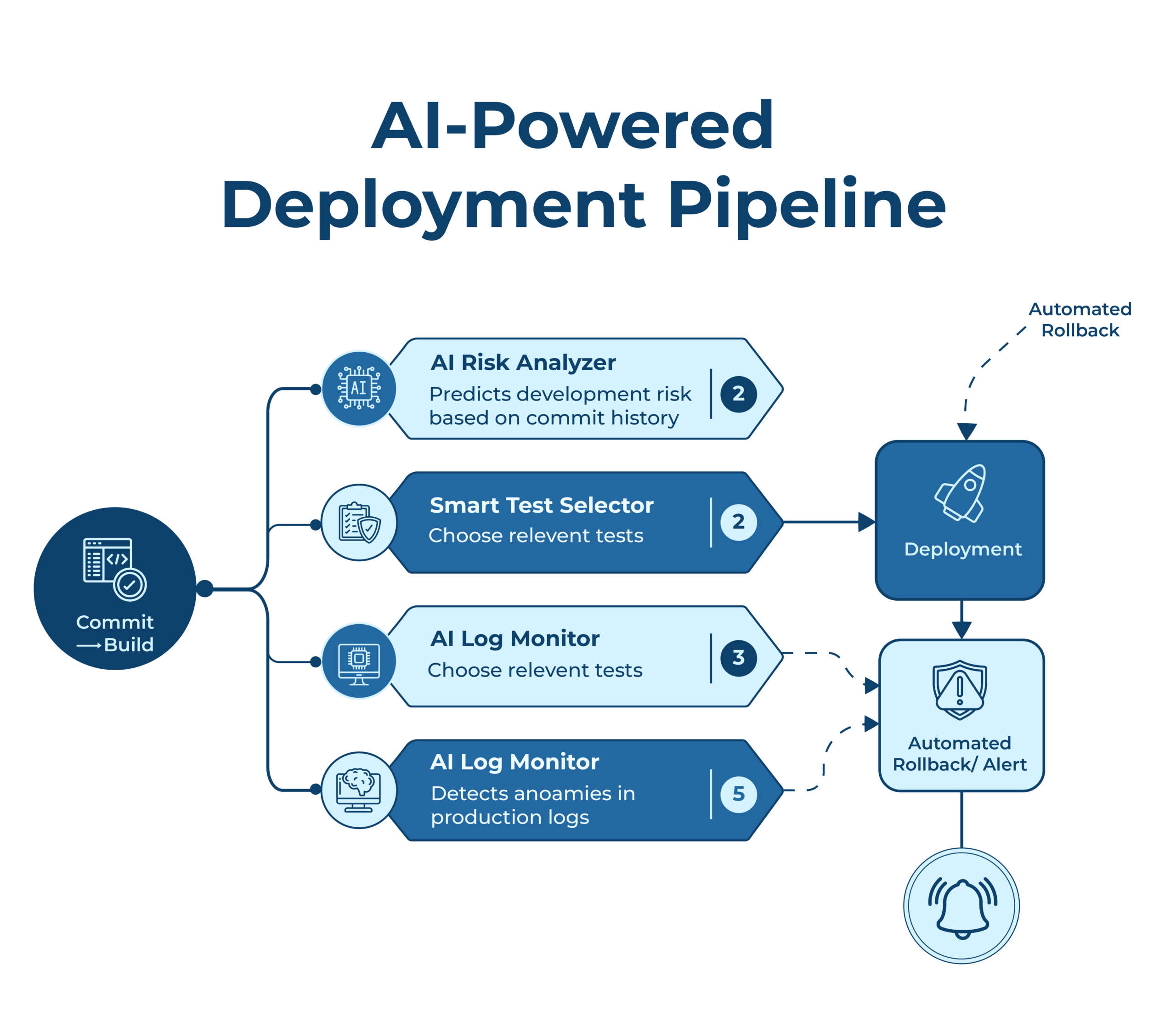
In practice, this can be visualized as a flowchart with AI components highlighted.
Tools and Frameworks
Several tools are emerging to integrate AI into CI/CD:
- GitHub Copilot and PR Review Bots: Suggest fixes during pull requests
- GitLab CI + ML Plugins: Prioritize test cases using ML models
- AWS CodePipeline + Amazon SageMaker AI: Integrate anomaly detection models
Additionally, organizations may build custom ML models, such as:
- Classification models for risk prediction
- NLP models for log analysis
- Reinforcement learning for pipeline optimization
Challenges and Considerations
AI in CI/CD is promising, but adoption comes with challenges:
- Data Quality – Models require sufficient historical data to learn effectively
- False Positives – Over-predicting risk can unnecessarily slow down pipelines
- Security – AI must not expose sensitive data
- Developer Trust – Teams must validate AI recommendations before full automation
Step 1: Setting Up the Angular Application
Initialize Angular Project:
ng new ai-cicd-demo –routing –style=scss
cd ai-cicd-demo
Build the Project:
ng build –prod
Push to GitLab Repository:
git init
git remote add origin <your-gitlab-repo-url>
git add .
git commit -m “Initial Angular project setup”
git push -u origin main
Step 2: Configuring GitLab CI/CD Pipeline
Create a .gitlab-ci.yml file in the root of your Angular project.
Step 3: Implementing AI Risk Analyzer
Create a Python script scripts/ai_risk_analyzer.py.
import sys
import json
import random
def analyze_commit(commit_sha):
# Placeholder: Replace with ML model or API call
risk_score = random.uniform(0, 1)
risk_level = “HIGH” if risk_score > 0.7 else “LOW”
report = {
“commit”: commit_sha,
“risk_score”: risk_score,
“risk_level”: risk_level
}
with open(“risk_report.json”, “w”) as f:
json.dump(report, f, indent=2)
print(f”Risk analysis complete: {risk_level} risk (score={risk_score:.2f})”)
if risk_level == “HIGH”:
sys.exit(“Deployment blocked: High risk detected.”)
if __name__ == “__main__”:
commit_sha = sys.argv[1]
analyze_commit(commit_sha)
This script simulates risk scoring. In production, you’d replace the random score with a trained ML model that uses commit metadata, bug history, or static analysis results.
Step 4: Deployment Script
Create a deploy.sh script to handle deployment.
#!/bin/bash
set -e
# Example: Deploy to AWS S3 bucket
aws s3 sync dist/ai-cicd-demo s3://your-angular-app-bucket –delete
echo “Deployment successful!”
Step 5: How AI Enhances the Pipeline
- Smart Test Selection: AI prioritizes tests based on commit changes
- Risk Prediction: AI flags risky commits before deployment
- Automated Rollback: AI detects anomalies in logs and triggers rollback
- Resource Optimization: AI dynamically adjusts pipeline resources
Conclusion
Integrating AI into CI/CD pipelines transforms them from automated systems into intelligent, adaptive workflows. Moreover, by combining modern deployment practices with AI-driven insights, teams can achieve faster releases, smarter testing, and reduced downtime. Start small with AI-assisted risk analysis and gradually evolve toward self-healing pipelines.