Why Kubernetes and AKS Go Beyond Container Orchestration
Kubernetes provides a consistent way to run containers at scale, but managing the control plane (API server, etcd, upgrades, and high availability) can consume significant engineering time. AKS offloads that operational burden to Azure, as Microsoft manages the control plane while you focus on your application workloads and day-to-day delivery. The result is a production-ready Kubernetes experience with tight integrations into Microsoft Entra ID, networking, monitoring, and CI/CD.
Highlights:
- Managed control plane: Azure runs the API server and etcd for you, while you manage the worker nodes that run your applications
- Simplified upgrade management: Control plane updates are handled by Azure, while you plan node upgrades on a schedule
- Elastic scaling for workloads: Autoscale both pods and node pools as traffic ebbs and flows
- Azure‑native integrations: Plug into Microsoft Entra ID/Kubernetes RBAC, Azure Monitor/Container Insights, Azure Container Registry (ACR), Key Vault, and private networking
- CI/CD and GitOps ready: Pair AKS with GitHub Actions, Azure DevOps, or Flux for declarative delivery
- Cost optimization levers: Mix VM sizes, right‑size pools, and use Spot nodes for non-critical workloads
AKS High-Level Architecture and Core Components
To better understand how these capabilities work together in practice, it is important to examine the core architecture and components of AKS.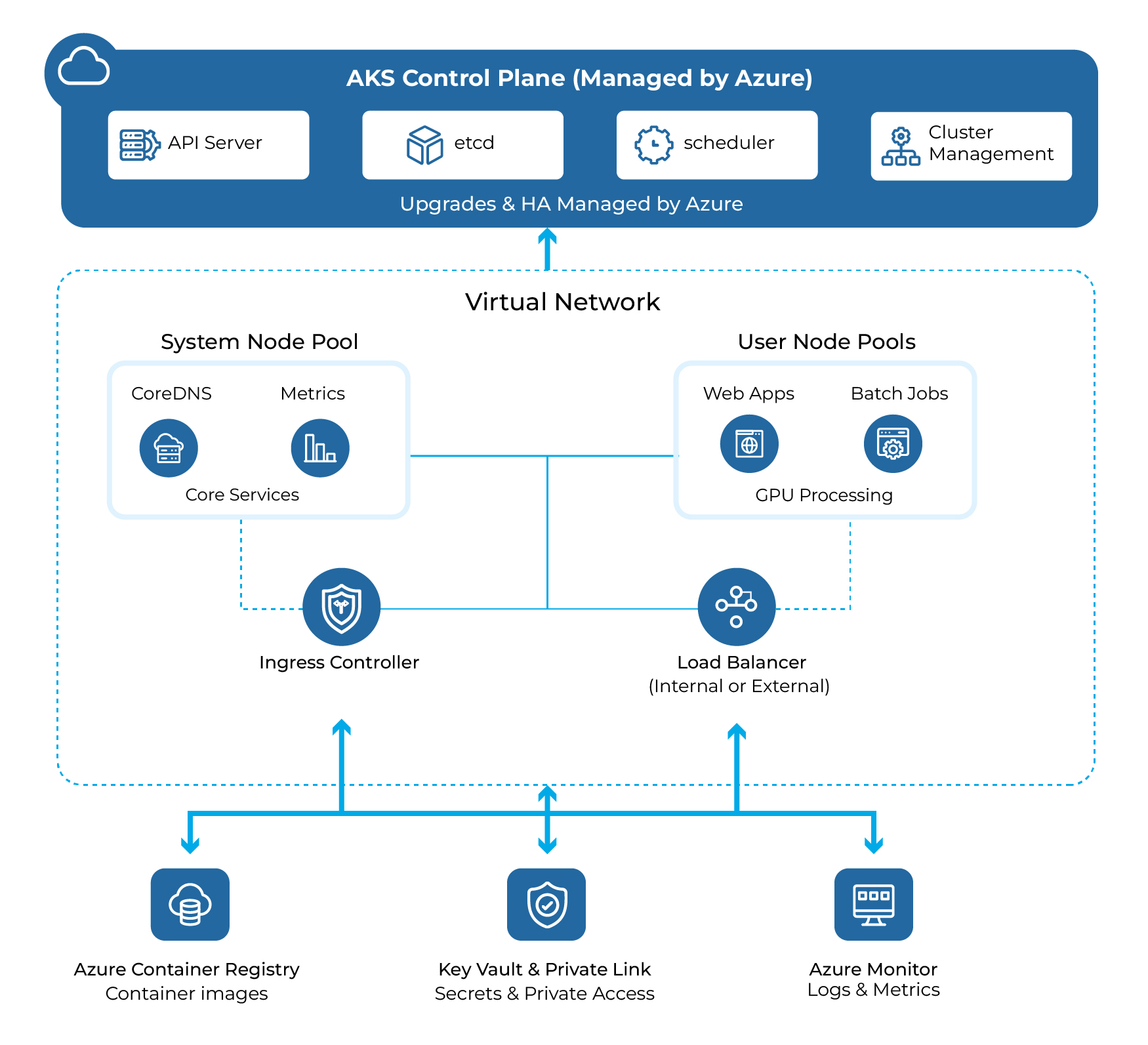 A high-level AKS diagram showing an Azure-managed control plane, a VNet with a system node pool and user node pools, an Ingress controller and load balancer, and integrations with ACR, Azure Monitor, and Key Vault.
Control Plane (Managed)
Azure operates the Kubernetes API server and etcd. AKS control plane management is included, while billing primarily applies to worker nodes and associated Azure infrastructure resources.
Node Pools
Keep add-ons in a small system pool (typically tainted to prevent them from being scheduled). Run application workloads on one or more user pools, mixing sizes and OS types to fit CPU‑intensive, memory‑heavy, or GPU-based workloads.
Kubernetes Objects
At the workload level:
- Pods package one or more containers
- Deployments orchestrate rolling updates and replica management
- Services provide stable endpoints for pods, while Ingress handles HTTP(S) routing and TLS termination
Networking Choices
- Azure CNI gives each pod an IP address from the VNet, making it ideal for enterprise policy enforcement and visibility
- Kubernetes uses NAT and is simpler for smaller clusters with fewer routable IP requirements
Images via ACR
Build and push container images to Azure Container Registry and pull them into AKS using least-privilege access controls for nodes and pods.
CI → ACR → AKS Deployment Flow
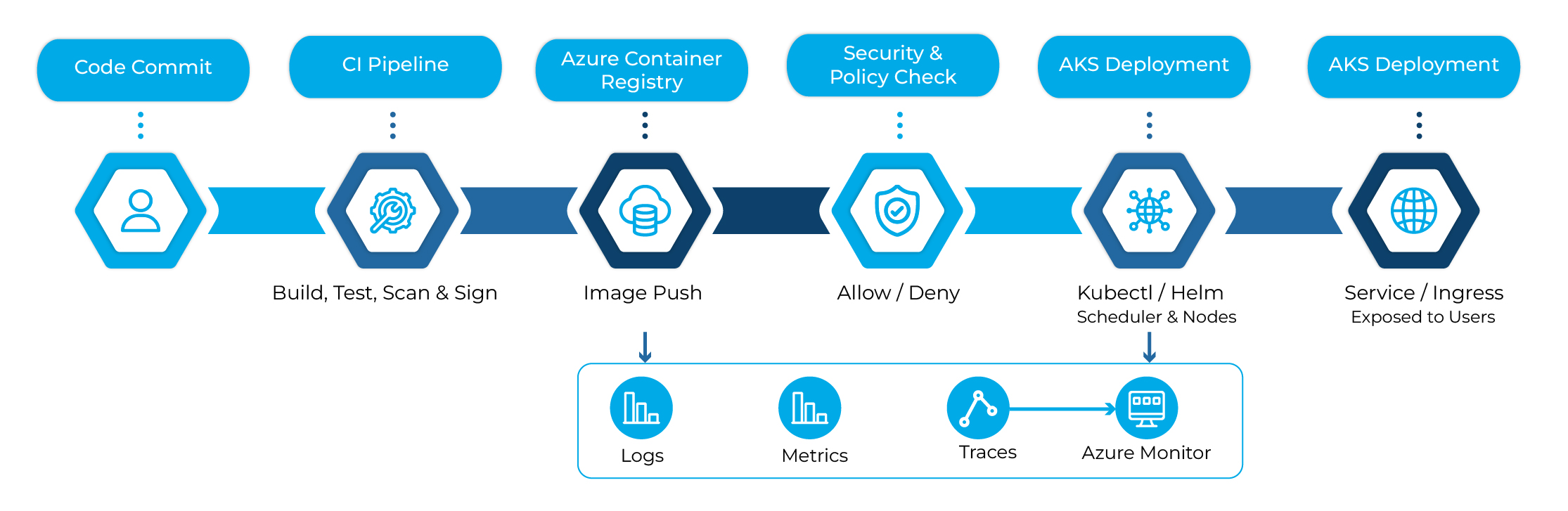
Flow from a code commit through CI build, scan, and signing, push to ACR, deployment to AKS with kubectl/Helm, service exposure through Ingress, and telemetry into Azure Monitor.
Production‑Ready Practices for Azure Kubernetes Service
Cluster and Node Pools
- Run system add‑ons on a dedicated, tainted system pool, and place application workloads on user pools sized by workload requirements (CPU, memory, or GPU)
- Prefer availability zones to improve resilience against datacenter-level failures
- Use ephemeral OS disks for faster scale-outs and node rebuilds
Security and Identity
- Choose Azure CNI with network policies and restrict egress through UDRs or Azure Firewall
- Use managed identities and Workload Identity for pod-to-Azure authorization, avoiding long‑lived secrets
- Integrate Microsoft Entra ID with Kubernetes RBAC and grant permissions through groups using the principle of least privilege
Supply Chain and Configuration
- Store images in ACR, enable signing (for example, cosign), and enforce policy through admission controls
- Continuously scan images using ACR or Microsoft Defender for Cloud
- Standardize on Helm or Kustomize and promote changes using GitOps (for example, Flux)
Observability
- Enable Azure Monitor and Container Insights from the start
- Capture logs, metrics, and traces; define SLOs and wire alerts for user experience, not just infrastructure utilization
Reliability
- Configure readiness and liveness probes correctly and add Pod Disruption Budgets
- Use the Horizontal Pod Autoscaler (HPA) together with Cluster Autoscaler
- Establish a backup and restore strategy for stateful workloads(for example, Velero with object storage)
Cost Optimization Tips for Azure Kubernetes Service
- Right‑size node pools by workload profile (CPU, memory, or GPU) to avoid over‑provisioning
- Enable Cluster Autoscaler and define realistic HPA targets to avoid unnecessary scaling events
- Use a Spot node pool for interruptible CI, batch, or ML workloads, while protecting critical workloads through priority classes
- Schedule a scale‑down for non-production clusters during off-hours
- Prefer a shared Ingress over multiple individual LoadBalancer services to reduce public IP and load balancer costs
- Apply cost allocation tags (team, application, and environment) and review Azure Advisor recommendations
Conclusion
AKS delivers Kubernetes without the operational complexity of managing the control plane. Start small with a development cluster, integrate ACR and monitoring, and evolve toward GitOps, identity-aware workloads, and autoscaling as demand grows. With the right node pool design, security posture, and observability strategy, organizations can accelerate delivery while maintaining control over cost, reliability, and governance. For guidance on planning and implementing AKS solutions, contact our cloud experts.