
How Can Azure Storage Actions Automate Data Management?
Enterprises generate and manage massive volumes of data every second, from customer records and transaction logs to analytics files and application data. Managing this growing volume manually is not only time-consuming but also increases the risk of errors and unnecessary storage costs.
This is where automation steps in, transforming complex, repetitive data operations into seamless, intelligent workflows. Microsoft Azure Storage Actions enables organizations to bring policy-based automation directly into their storage environments, ensuring data is managed efficiently and securely with minimal human intervention.
Introducing Azure Storage Actions
Azure Storage Actions is a managed Azure service that automates storage tasks based on predefined conditions and rules. It allows you to define actions based on triggers and conditions, so your storage environment can automatically perform routine storage tasks.
For example, you can configure storage tasks to:
- Move files to Cool or Archive storage tiers after 30 days
- Delete temporary files once they’re no longer needed
- Apply actions to blobs that meet specific conditions
This helps organizations manage data consistently without manually monitoring storage accounts.
The Business Value of Automated Data Management
Automation has become an important part of modern data management. As cloud data continues to grow exponentially, manual data management turns into a major roadblock, slowing innovation and increasing operational expenses.
Automated Data Management with Azure Storage Actions addresses these challenges by offering an automation-first framework that makes data handling more efficient, secure, and scalable. Built on Microsoft Azure’s architecture, the service helps organizations streamline workflows, strengthen compliance, and optimize storage costs while maintaining control of their data.
Solution Highlights
Azure Storage Actions helps organizations simplify storage management through rule-based automation.
- Reduce Manual Effort: Automatically move, archive, or delete files based on predefined rules, reducing repetitive manual work
- Ensure Compliance: Enforce policies uniformly across all data assets, minimizing risk and ensuring audit readiness
- Enhance Agility: Allow teams to spend more time on analysis and business priorities instead of routine maintenance
- Lower Storage Costs: Automatically move inactive or aging data to lower-cost storage tiers, reducing storage expenses
- Seamless Integration: Works with existing enterprise systems and Azure services, allowing organizations to adopt it without disrupting current workflows
By automating routine storage operations, Azure Storage Actions helps organizations manage data more consistently, reduce operational effort, and make better use of their cloud storage.
How Azure Storage Actions Work
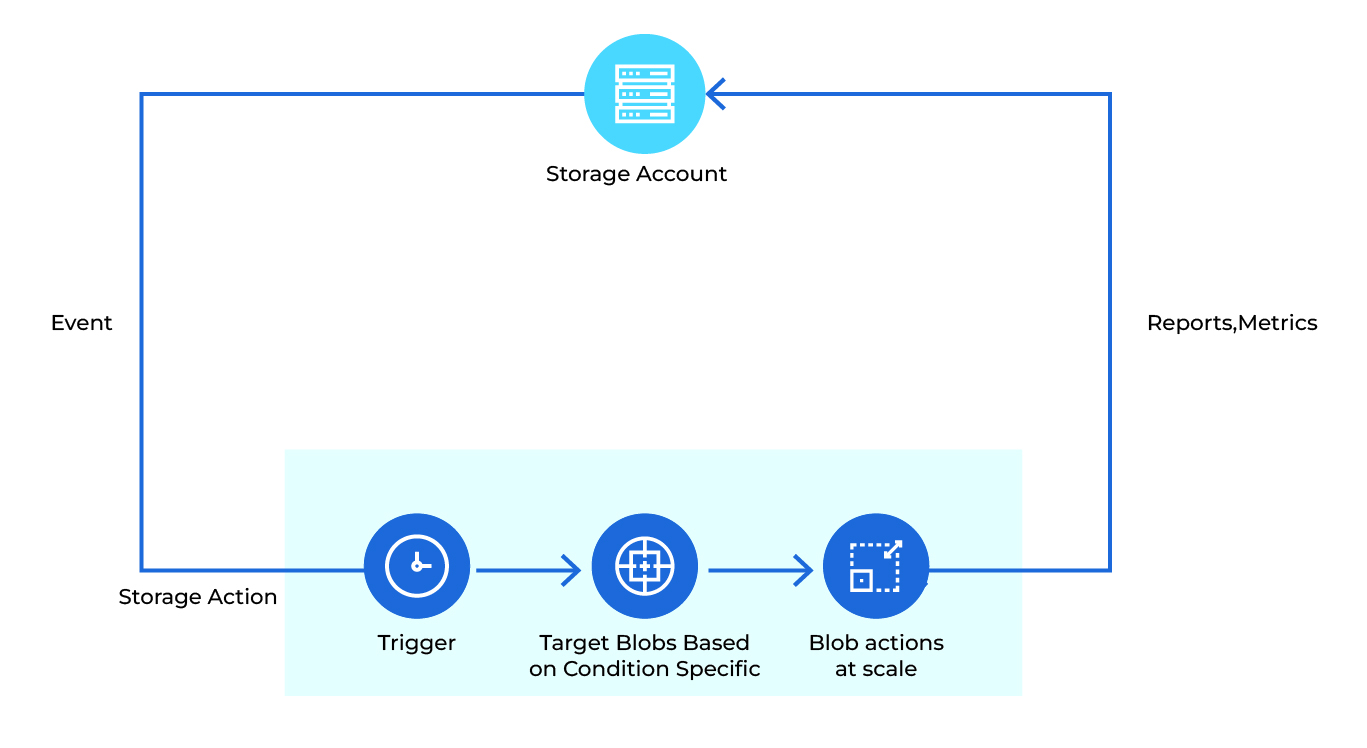
Azure Storage Actions evaluates blobs against predefined conditions before applying the required action. The process follows three simple steps.
Task Execution
A storage task runs according to its configured schedule and begins evaluating blobs within a Storage Account. This removes the need to manually review large numbers of files before taking action.
Condition
Next, Storage Actions checks specific rules to decide which blobs to act on — for example:
- If the file size is more than 1 GB
- If the blob hasn’t been accessed in 90 days
- If it matches certain tags or metadata
Only blobs that meet these conditions move to the next step.
Action
Azure Storage Actions then automatically performs the configured action, such as moving, deleting, archiving, or tagging blobs.
All these steps are powered by Azure Event Grid and Azure Functions, which make the process seamless and low-code. You can easily track and manage everything in the Azure portal, getting reports and metrics while providing visibility into storage operations through reports and metrics.
Key Capabilities That Support Enterprise Data Management
Beyond automating routine storage tasks, Azure Storage Actions provides capabilities that help organizations manage growing data volumes with greater consistency and control.
- Automated Workflows: Create rule-based actions that automatically move, copy, or delete files based on business logic without manual intervention
- Metadata-Based Data Organization: Organize and manage data based on metadata, usage patterns, or file types to simplify storage management
- Policy-Driven Governance: Enforce retention, access, and compliance policies across storage accounts with precision and consistency
- Cloud-Native Scalability: Scale with Azure’s infrastructure to handle data volumes ranging from gigabytes to petabytes while maintaining performance
- Seamless Integration: Works with Azure services such as Azure Logic Apps, Azure Event Grid, and Azure Functions to support end-to-end workflow automation
- Centralized Monitoring: Gain visibility into storage operations through built-in dashboards and logs that provide actionable insights
- Cost Optimization: Automatically identify and tier inactive data to lower-cost storage, helping organizations manage storage costs more effectively
Real-World Use Cases Across Industries
Automation through Azure Storage Actions is transforming how organizations manage and move data across sectors by bringing efficiency, compliance, and cost savings to everyday operations.
- Banking and Finance – Automate the storage and archival of transaction records, audit files, and compliance reports to improve record management and support audit requirements.
- Healthcare and Life Sciences – Manage medical images, patient records, and laboratory reports while maintaining strict data privacy and security requirements.
- Retail and E-Commerce – Streamline product data synchronization, order history management, and customer invoice archival to support day-to-day operations.
- Manufacturing – Handle IoT data, production logs, and quality reports to improve operational visibility and storage utilization.
- Energy and Utilities – Automate data ingestion from sensors and field systems to support performance monitoring and predictive maintenance.
- Public Sector and Government – Enforce retention, compliance, and governance policies consistently to maintain transparency and support audit requirements.
Conclusion
The value of storage automation goes beyond reducing manual effort. It helps organizations manage data more consistently, apply governance policies with confidence, and keep storage aligned with changing business needs. Azure Storage Actions provides a practical foundation for managing enterprise storage, helping IT teams to spend less time on routine administration and more time delivering reliable services across the organization.